
-

Try advanced features for free
Get Smarter responses, upload files, create images, and more by logging in.
Log In Sign up & Earn $5

Top Claud Use Cases That Actually Help Small Businesses

Running a small business usually means your day gets split into fragments. You start writing a customer reply, switch to a sales follow-up, jump into fixing a piece of content, then go back to something you half-finished earlier. By the end of the day, a lot of time goes into switching between tasks instead of finishing them.
The problem is not the work itself. It is the constant reset. You keep rethinking the same things. how to phrase a reply, how to structure a message, how to turn rough notes into something usable.
Claud fits into this gap. It helps you move things forward instead of letting them sit half-done. Drafts get cleaned up, notes get structured, and replies become easier to handle.
If you are trying to see where it actually helps, the use cases below focus on situations that come up every day.
What Claud Actually Helps You Do Day to Day
Claud works best on tasks that involve writing or information.
You can use it to:
- Draft content
- Fix unclear writing
- Summarize long text
- Organize scattered notes
- Work with files without breaking your flow
That is the base. Most use cases come from this.
Claud Use Cases That Actually Make Sense
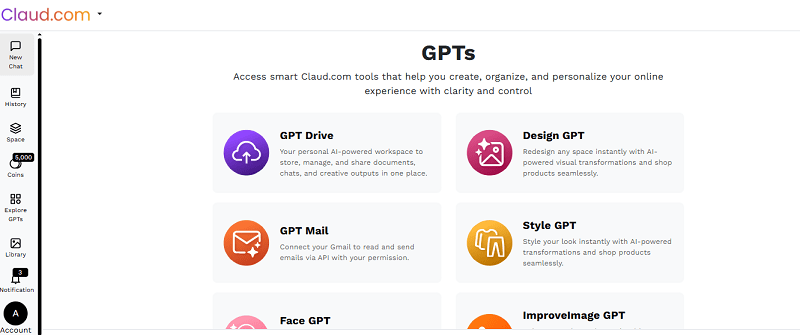
When people look up Claud use cases, they usually want something practical. These are the ones that actually make a difference.
Respond to Customers Without Rewriting Everything (AI for Customer Support)
Customer support repeats itself. Same questions, same type of replies.
With AI for customer support, you stop starting from zero every time.
- Draft replies quickly
- Fix the tone when something sounds off
- Get a short summary before replying
Example:
A customer asks about a refund. You generate a reply, adjust a line, and send it.
That is where AI for customer support helps. It saves time without removing control.
Create Marketing Content and Visuals Together (AI Marketing Automation)
Marketing is ongoing work. Content never really stops.
With AI marketing automation, Claud helps you write and build visuals in the same place.
You can:
- Draft Emails
- Write captions
- Expand tentative ideas
- Build on the content
- Generate visuals with Imagine GPT
- Enhance image quality with ImproveImage GPT
Example:
You write a product update. It becomes an email draft. Then you create visuals alongside it without switching tools.
This is where AI marketing automation becomes useful. You are not just writing, you are completing the task.
Write Better Sales Messages and Follow Ups (AI Sales Tools SMB)
Sales often comes down to how clearly you communicate.
Using AI sales tools SMB, you can:
- Draft outreach emails
- Write follow-ups
- Turn notes into proposals
- Summarize discussions
- Use GPT Mail to handle emails
Example:
After a call, your notes become a clean follow-up message that is ready to send.
This is where AI sales tools SMB helps. It keeps communication sharp.
Handle Routine Work Without Getting Stuck (Business Automation AI)
A lot of work is small but repetitive.
With Claud, a business automation AI, you can:
- Convert messy notes into organized documents
- Generate report Summaries
- Manage work with MyGPTspace
- Save files with GPT Drive
Example:
You distill your disorganized meeting notes into clear bullet points and actionable items for the team.
That's the way business automation AI works here. It handles the small tasks that usually slow you down.
Work With Files Without Breaking Your Flow
A lot of time goes into finding files, opening them, and then working on them separately.
Claud simplifies this.
You can:
- Submit and review documents for analysis
- Extract the highlights
- Edit content and work with files in-line
- Keep everything in GPT Drive, and you have access from anywhere
Example:
Instead of reading a long document manually, you upload it, summarize it, and continue working on it in one flow.
This reduces unnecessary switching and keeps your work connected.
Turn Rough Ideas Into Usable Content
Starting is often the hardest part.
Claud helps you:
- Expand ideas
- Structure thoughts
- Build from rough input
Example:
You begin with a few lines and end up with something you can actually use.
This is one of the more consistent Claud use cases.
Reduce Internal Back and Forth
Internal work takes more time than it should. Messages get rewritten. Notes stay messy.
Claud helps by:
- Cleaning up internal communication
- Structuring documents
- Creating quick summaries
Example:
Instead of rewriting the same thing multiple times, you fix it once.
Where Claud Fits Clearly and Where It Does Not
It helps with:
- Writing
- Summarizing
- Structuring
- Working with files
- Supporting communication
It does not:
- Replace business tools
- Run full systems
- Handle everything automatically
This keeps expectations clear when using AI marketing automation, AI sales tools SMB, and business automation AI.
Why It Works for Small Businesses
Small businesses do not need more tools. They need fewer slow points.
Claud helps by:
- Reducing repetitive work
- Making communication clearer
- Speeding up content creation
- Keeping work connected
Instead of starting from scratch, you start from something usable. This is where human AI collaboration is redefining Work in small teams.
That is the real value behind Claud use cases.
Conclusion
Claud fits into the work you already do. It does not change your systems. It helps you move faster inside them.
From AI for customer support to AI marketing automation, and from AI sales tools SMB to business automation AI, the role stays consistent. It supports the work and reduces the effort.
Used properly, it saves time without adding complexity.
FAQs
How does Claud help when you are dealing with messy or unstructured information?
Claud is actually useful when your input is messy. You don't have to clean things up before using it. Just put in your rough notes, half-formed ideas, or incomplete drafts. It helps you sort it out and turn it into something clearer. This is helpful when you just want to get thoughts out first and fix them later.
Can Claud be used for reviewing work before sending it out?
Yes, and this is often overlooked. You can use it to check tone, clarity, and structure before sending emails, proposals, or content. It acts like a second pass that helps you avoid unclear communication or small mistakes that usually get missed.
Does Claud help reduce dependency on multiple tools?
It can, especially for smaller tasks. Instead of opening different tools for writing, editing, or cleaning up content, you can handle a lot of it in one place. It does not replace everything, but it cuts down the need to switch tabs for simple work. Over time, that saves effort and keeps your workflow less scattered.



What can I help you with?
Unlock more with ClaudGPTPlus
ClaudGPTPlus gives you higher limits, smarter models, and more.